
Render HTML Next with C#
Install the NuGet package, compile a component once, and render it with request data. For an interactive page, build matching JavaScript assets and hydrate the same component in the browser.
Requires .NET 10. Browser builds also require Node 24 and Vite.
Install and render
Create an ASP.NET application:
dotnet new web -n HtmlNextDemo --framework net10.0
cd HtmlNextDemo
dotnet add package NextWebWG.HtmlNext --version 1.0.0-alpha.2
Replace Program.cs:
using HtmlNext;

var app = WebApplication.CreateBuilder(args).Build();
var card = HtmlNextCompiler.Compile("""
    <template component="x-card">
      <defs><prop name="title" type="string" required>Card title.</prop></defs>
      <article><h1>{$title}</h1></article>
    </template>
    """, "card.html");

app.MapGet("/", (string? title, CancellationToken cancellationToken) =>
    Results.Content(card.Render(new { title = title ?? "Hello from C#" }, cancellationToken),
        "text/html; charset=utf-8"));
app.Run();
Run dotnet run --urls http://localhost:5000 and open http://localhost:5000/?title=Welcome. The response contains <article><h1>Welcome</h1></article>. Text and attribute bindings escape supplied values.
The application obtains request data. The retained template is immutable and can serve concurrent requests; each render owns its input snapshot. Render returns a string, and Write writes to a TextWriter. Both accept cancellation. Use Validate for declared root prop constraints.
Load a component file
Keep the component definition in components/card.html and load it during startup:
var source = await File.ReadAllTextAsync("components/card.html");
var card = HtmlNextCompiler.Compile(source, "components/card.html");
Pass values using the names declared by the HTML component. For example, a C# model's Title property can supply the component's title prop with new { title = report.Title }.
Check prop constraints
Validate returns errors for the root component's declared prop constraints. Applications choose how to present those errors:
var model = new { title = "Quarterly report" };
var errors = card.Validate(model);
var html = card.Render(model);
Keep the page interactive
The C# hydration guide walks through a complete ASP.NET application. C# renders a count and its computed double; JavaScript hydrates the result and updates both on a click.
The C# setup has three steps:
- Build the component with
@nextwebwg/html-next-unpluginandhydrate: true. Keep its JavaScript, stylesheets andhtml-next.manifest.jsontogether. - Read the manifest with
HtmlNextServerAssets.FromManifest, then compile the matching source with those assets. Retain that graph or template at application startup. - Render with
new HtmlNextRenderOptions { Interactive = true }and load the built browser entry, which importshydratefromvirtual:html-next/hydrate.
Source fingerprints are checked during compilation. Rebuild and deploy the source and assets together after a component changes. Include the graph's emitted stylesheets when the component uses styles.
C# supplies initial rendering and the browser handoff. Browser modules own event handling, later state changes, subscriptions and refreshes. The current C# input supports the JavaScript module connect pattern used in the example; declarative <handler> bodies and on: attributes remain outside its supported input.
Rendering speed
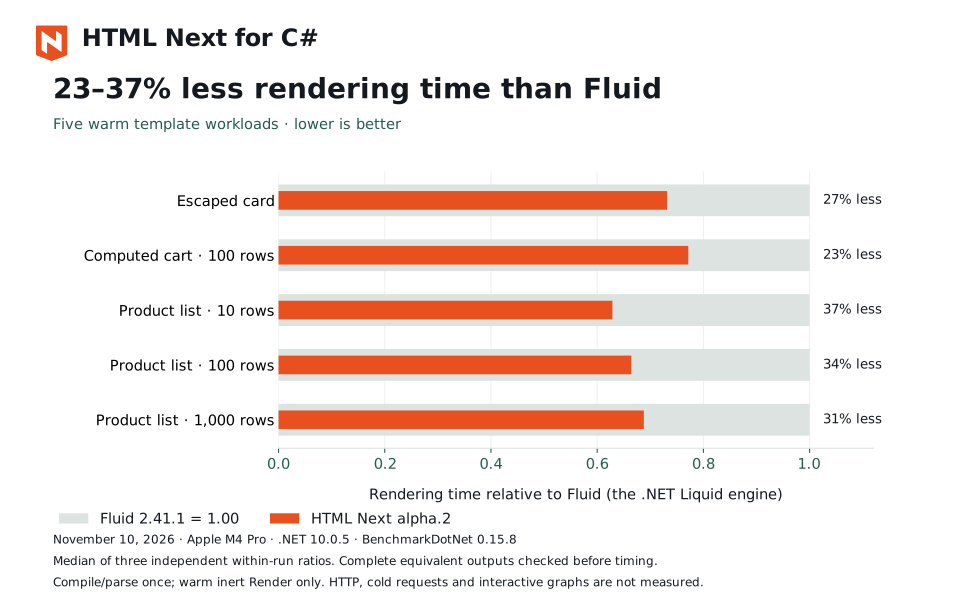
The comparison uses Fluid 2.41.1, the .NET Liquid implementation, and checks complete equivalent output before timing. See performance and measurement limits.
API and examples
- NuGet package
- Complete C# counter application
- Renderer API and supported input: component graphs, source resolution, stylesheets, prop validation and application-prepared module data.
- Full-stack Node and C#